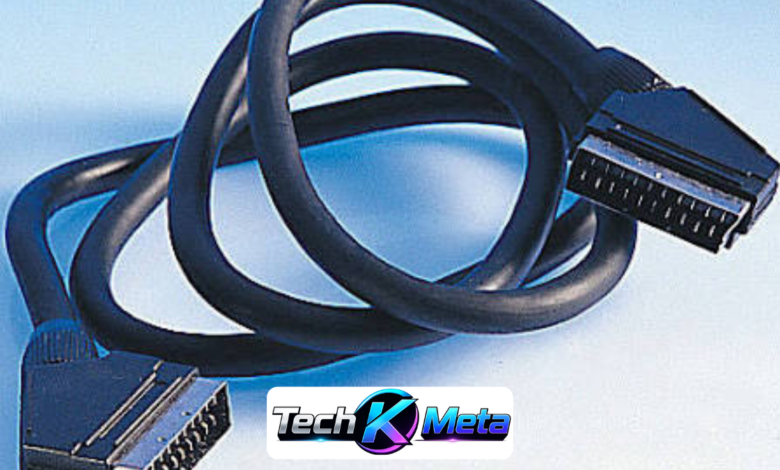
SCART may look like an old-fashioned connection in an age dominated by HDMI, streaming devices and wireless technology, yet it remains useful for many older entertainment systems. From classic televisions and VCRs to DVD players and retro games consoles, this connection can still provide a practical way to link compatible equipment. Understanding how the technology works makes it easier to select the correct cable and avoid frustrating compatibility problems.
For anyone restoring an older television setup, preserving classic hardware or enjoying retro gaming, choosing the correct connection can make a noticeable difference. Not every cable offers the same wiring or signal capabilities, and not every SCART socket behaves identically. By considering the equipment, signal type, cable construction and intended use, buyers can find a dependable solution without spending money on unnecessary accessories or unsuitable converters.
What Are Scart Leads?
Scart leads are analogue audio and video cables designed around the SCART connector, a distinctive rectangular plug featuring multiple pins. The standard became especially popular across Europe during the era of analogue home entertainment. A single connection could carry video and stereo audio between compatible devices, reducing the need for several separate cables. This made SCART particularly convenient for televisions, VCRs, DVD players, satellite receivers and other household equipment.
The connector can carry different types of analogue signals depending on the equipment and internal cable wiring. Composite video is commonly associated with basic SCART connections, while compatible devices can also use RGB signals for improved image quality. This flexibility explains why SCART remained popular for many years. Although modern digital interfaces have largely replaced it, the connector still has practical value for owners of older technology.
How Do Scart Leads Work?
Inside a SCART connector are multiple pins assigned to Scart Leads different functions, including audio, video and control signals. When compatible devices are connected, these individual pathways allow information to travel between the source and display. Some equipment can also use control signals to switch a television automatically to the appropriate AV input. This feature was particularly convenient when SCART was a standard part of everyday home entertainment.
The quality and functionality of the connection depend on the equipment as well as the cable. A correctly wired cable can support RGB video when both connected devices are designed for it, potentially producing a cleaner picture than composite video. However, simply seeing a SCART socket does not guarantee that every available signal is supported. Checking the manuals or specifications of both devices is therefore an important step.
Different Types of Scart Leads Explained
There are several cable configurations available, including SCART-to-SCART, SCART-to-RCA and SCART-to-S-Video options. These variations exist because older equipment was not always designed around identical connection standards. A television might have a SCART socket, while another device could provide RCA outputs. Selecting the correct configuration depends on which connectors are available and what type of audio and video signal needs to travel between them.
Fully wired versions can be useful when additional SCART functions are required. Basic cables may only carry the signals needed for straightforward composite video and stereo audio, whereas a properly wired version can support more capabilities where the equipment allows them. Buyers should therefore pay attention to descriptions such as fully wired, RGB compatible or directional. These details can be more important than cable appearance or price.
How to Choose Scart Leads for Your Equipment
The first step is to identify exactly which devices you intend to connect. Check the model numbers, available sockets and supported video formats before ordering anything. It is also worth establishing whether the SCART socket is designed for input, output or both. These details can determine whether a particular cable will work correctly, especially when connecting a television to a video recorder or another older source device.
Cable length and construction are also worth considering. A short cable may be perfectly suitable for equipment positioned close together, while a longer installation may benefit from better shielding to reduce potential analogue interference. Strong connectors, sensible strain relief and flexible cable construction can improve everyday reliability. There is rarely a need to buy the most expensive option, but extremely basic cables may not provide the functionality required by specialist equipment.
Scart Leads and Retro Gaming
Retro gaming is one of the clearest examples of why this older connection remains relevant. Many classic consoles were designed during a period when analogue televisions were standard, and some systems can provide RGB video through SCART. When the console, cable and display all support the appropriate signal, RGB can produce a sharper and cleaner image than basic composite video, making it attractive to enthusiasts.
However, retro gamers should avoid assuming that one cable will work perfectly with every classic console. Different systems can use different wiring arrangements, output formats and connector configurations. A cable specifically designed for the relevant console can therefore be a better choice than a generic product. Before buying, check the exact console model, video output and display requirements to ensure that the chosen connection matches the complete setup.
SCART Compared With HDMI
SCART and HDMI belong to very different generations of home entertainment technology. SCART is an analogue connection designed for older equipment, whereas HDMI is a modern digital interface commonly used with high-definition televisions, games consoles, Blu-ray players and streaming equipment. HDMI generally offers greater convenience for contemporary systems, but it does not make older analogue hardware obsolete when a suitable connection remains available.
Connecting old equipment to a modern television can require more than simply changing the shape of the connector. A passive cable cannot normally transform an analogue SCART signal into a digital HDMI signal. An active converter is generally needed to process the original signal and create an HDMI-compatible output. Buyers should therefore distinguish between simple adapters and genuine signal converters before purchasing, as the two perform very different jobs.
Common SCART Problems and How to Fix Them
A missing picture is one of the most common problems when using older AV equipment. Start by checking that the connector is fully inserted and that the television is set to the correct AV input. If the image remains unstable, distorted or unexpectedly coloured, the problem could involve cable wiring, signal compatibility or the settings on the source device. Testing another suitable cable can help narrow down the cause.
Audio issues can also occur when the cable or equipment does not support the expected signal path. If the picture appears correctly but there is no sound, check the television volume, source settings and cable configuration. A black-and-white image may indicate a signal-format problem rather than a damaged television. Careful troubleshooting is usually more effective than immediately replacing equipment, particularly when working with older technology.
Are Scart Leads Still Worth Buying?
For a modern entertainment system built around current televisions and digital devices, SCART is rarely the first choice. However, it remains useful for people who own older televisions, VCRs, DVD players, satellite receivers or classic games consoles. If existing equipment is functioning correctly, purchasing a compatible cable can often be a simpler and more affordable solution than replacing the entire setup.
Collectors and retro gaming enthusiasts can also benefit from maintaining compatible analogue connections. Older equipment has a character and purpose that modern replacements do not always replicate, particularly when original hardware is being preserved. The important consideration is to purchase according to actual technical requirements. A suitable cable with the correct wiring and signal support is generally more valuable than an expensive product with features the equipment cannot use.
Buying Scart Leads: What Should You Check?
When shopping for a cable, begin with compatibility rather than price. Determine which connectors are present on both devices and identify whether you require SCART-to-SCART, SCART-to-RCA or another configuration. Next, establish whether the equipment needs composite, RGB or another supported analogue signal. This simple checklist can eliminate many unsuitable options before you even compare individual products.
It is also sensible to examine the cable description carefully. Terms such as fully wired, RGB compatible, bidirectional and shielded can provide useful information about construction and functionality. Customer reviews may reveal practical problems, but technical specifications should remain the priority. A well-matched cable does not need to be excessively expensive; it simply needs to support the connection, signal and equipment for which it is intended.
Conclusion
Although SCART is no longer the standard connection for modern televisions, it continues to serve a useful purpose in older entertainment systems. Its ability to carry analogue audio and video through a single connector makes it valuable for legacy equipment, while its support for RGB on suitable systems has helped it remain popular among retro gaming enthusiasts and collectors.
The best purchasing decision comes from understanding the equipment first and the cable second. Check the sockets, signal types, direction and wiring requirements before ordering. Whether you are reconnecting a classic VCR, restoring an older television or building a retro gaming setup, careful compatibility checks can help deliver reliable performance and prevent unnecessary purchases.
Frequently Asked Questions
What are SCART leads used for?
SCART leads are used to connect older audio and video equipment, including televisions, VCRs, DVD players, satellite receivers and some games consoles. They can carry analogue video and stereo audio through a single connector, depending on the equipment and cable wiring.
Are all SCART leads the same?
No. SCART leads can differ in wiring, signal support, direction and construction. Some basic cables support composite video and audio, while fully wired versions may support additional functions such as RGB video when the connected equipment allows it.
Are SCART leads still useful today?
Yes. Although HDMI has replaced SCART in most modern systems, SCART remains useful for older televisions, VCRs, DVD players and retro gaming consoles. They are particularly valuable when maintaining or restoring legacy entertainment equipment.
Are SCART leads good for retro gaming?
SCART can be an excellent choice for compatible retro gaming systems. Where a console and display support RGB, a suitable SCART connection can provide a sharper and cleaner picture than basic composite video.
Can I connect a SCART device to an HDMI TV?
Yes, but a simple cable is usually not enough. Because SCART carries an analogue signal and HDMI uses digital signals, an active SCART-to-HDMI converter is generally required to process the signal correctly.
What is a fully wired SCART lead?
A fully wired SCART lead has connections across the relevant pins rather than only supporting a limited selection of signals. This can be important for equipment that requires RGB, additional audio paths or other SCART functions.
Why is my SCART picture black and white?
A black-and-white picture can result from incompatible signal settings, incorrect video modes, cable wiring problems or equipment compatibility issues. Check the television input and source-device settings first, then inspect the cable and connections.
How do I choose the right SCART lead?
Check the exact devices you want to connect, their SCART socket functions and the video signal they support. Then consider whether you need a fully wired cable, RGB compatibility, a particular direction, specific connectors or an active converter.
Also Read: david tennant net worth